How to run Meta ads: a step-by-step guide to Instagram and Facebook advertising
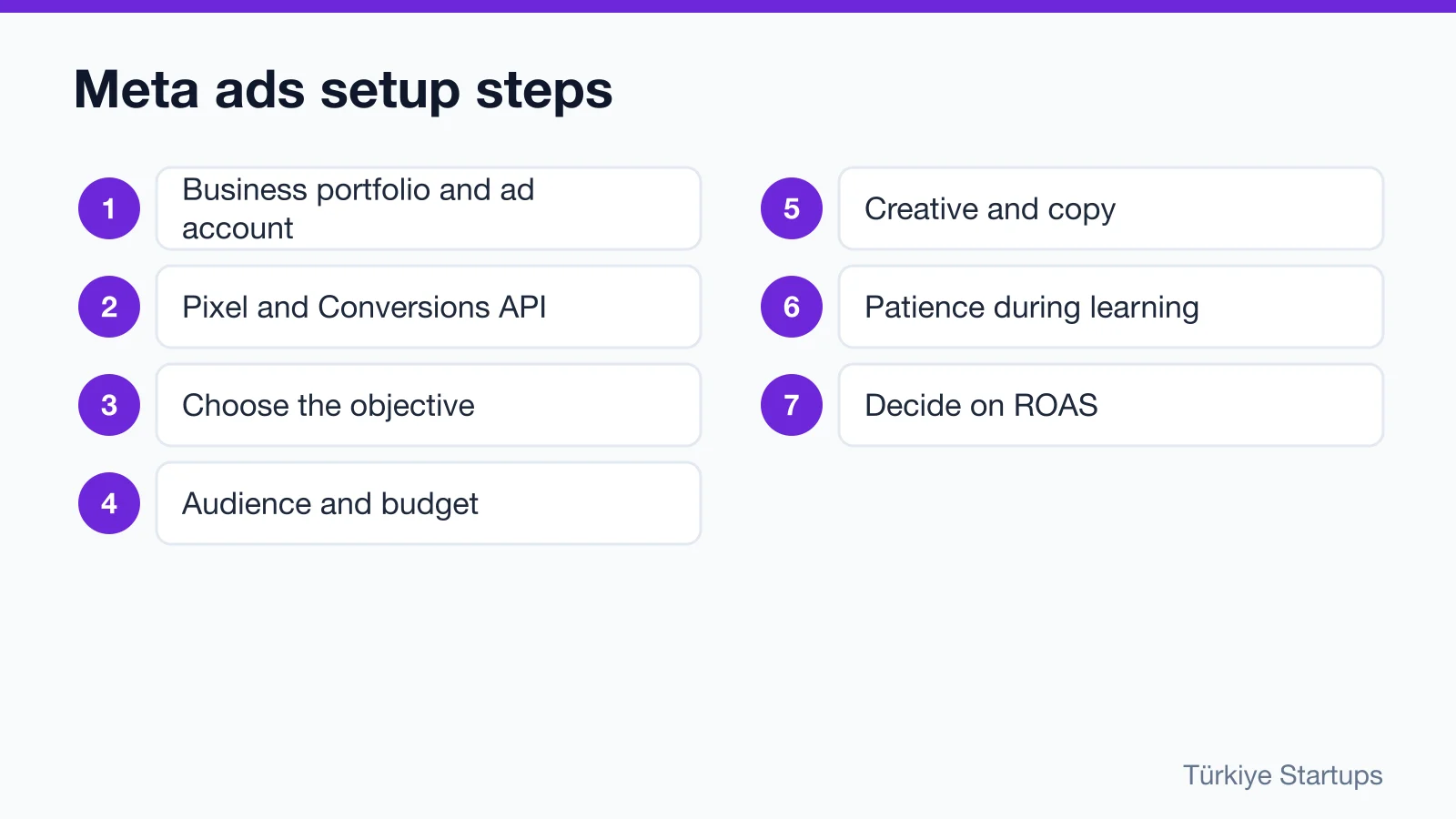
A beginner's guide to Instagram and Facebook ads: setting up a Meta business portfolio and ad account, Meta Pixel and Conversions API, campaign, ad set and ad structure, objectives, custom and lookalike audiences, budget and the learning phase, effective creatives, ROAS and break-even maths, policies and common mistakes.
By Editorial Team

Instagram and Facebook reach millions of people in Türkiye and allow targeted ads even on small budgets. For e-commerce brands, local businesses, apps and B2C startups, Meta ads are often the fastest customer acquisition channel. But poor setup, unmeasured campaigns and weak creatives burn budgets fast. This guide covers account setup, campaign structure, audiences, budget, creatives and profitability.
Preparation checklist
A Facebook Page and Instagram professional account; a Meta business portfolio (Business Manager / Business Suite); an ad account and payment method; measurement with Meta Pixel and ideally Conversions API; a conversion-focused landing or product page (see conversion-focused landing pages); and GA4 for cross-channel comparison (see Google Analytics 4 setup).
Step 1: Pixel and Conversions API
The Meta Pixel sends on-site events (page views, add to cart, purchases, leads) to Meta; Conversions API sends them from your server, reducing data lost to browser restrictions and ad blockers. Most e-commerce platforms integrate both. Verify your domain, configure priority events, check with the Test Events tool and make it work with your cookie consent (see our KVKK guide).
Step 2: Campaign structure
| Level | What you set |
|---|---|
| Campaign | Objective (sales, leads, traffic…) |
| Ad set | Audience, budget, schedule, placements, optimisation goal |
| Ad | Image or video, copy, headline, link, call to action |
Objectives: Awareness, Traffic, Engagement, Leads, App promotion, Sales. Choose by business goal: if you want sales, pick Sales, not Traffic; Meta optimises for what you choose.
Step 3: Audiences
Core audiences by location, age, gender, language and interests; custom audiences of site visitors, Instagram engagers or customer lists (compliant with data protection), ideal for retargeting; lookalikes resembling your customers; and broad targeting / Advantage+, letting Meta's AI find people, which often works well with enough conversion data. See customer personas.
Step 4: Budget and the learning phase
Set daily or lifetime budgets. New ad sets go through a learning phase; Meta recommends around 50 optimisation events within about a week to exit it. Avoid frequent edits during learning, as significant changes can reset it, and start with fewer, well-funded ad sets.
Step 5: Creatives
Creative is the biggest driver: hook viewers in the first 3 seconds; use 9:16 vertical video for Reels and Stories; test user-generated content (see influencer marketing); make a clear offer and call to action; add subtitles; vary angles and formats and refresh when fatigue sets in. See product photography.
Step 6: Measurement and profitability
| Metric | Meaning |
|---|---|
| CPM | Cost per 1,000 impressions |
| CTR | Click-through rate |
| CPC | Cost per click |
| Conversion rate | Share of clickers who buy |
| CPA | Cost per acquisition |
| ROAS | Revenue per unit of ad spend |
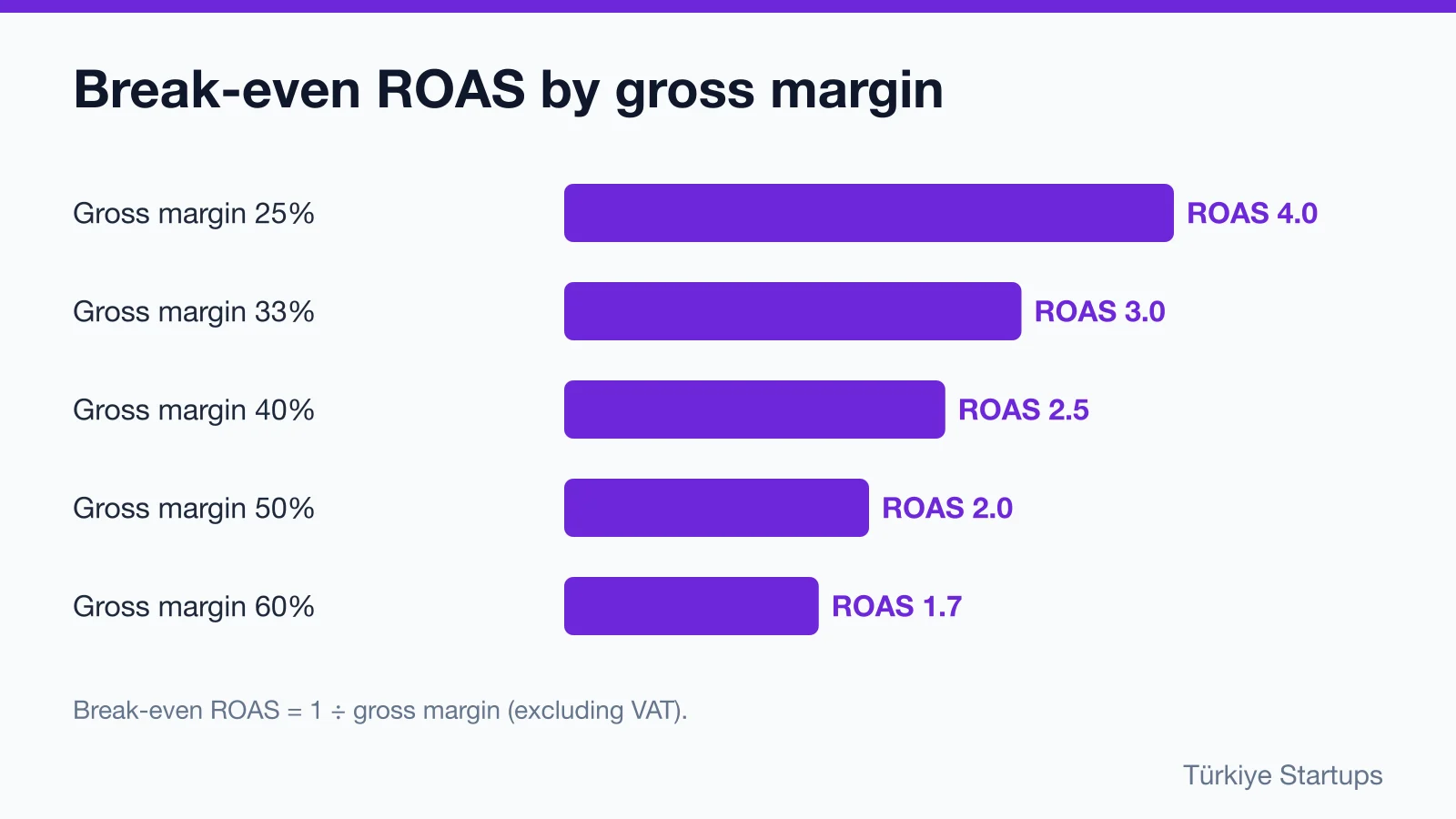
Break-even ROAS = 1 ÷ gross margin. With a 40% gross margin (after product cost, shipping and fees, excluding VAT), break-even ROAS is 2.5: every 1 of ad spend must bring at least 2.5 in net sales. Higher customer lifetime value can justify lower first-order ROAS. See CAC and LTV and profit margin.
Policies
Ads violating Meta's policies (misleading claims, before-and-after images, certain health and finance claims) are rejected or can restrict accounts. Credit, employment, housing and social or political issue ads fall under special ad categories with limited targeting. Local consumer and advertising rules also apply, such as price display, discount campaigns and ad disclosure for influencers.
Common mistakes
Advertising without Pixel and conversion tracking; choosing Traffic or Engagement when you want sales; daily edits during learning; too many small ad sets; one creative for too long; judging success without break-even ROAS; slow or poor mobile landing pages.
Frequently asked questions
How do I run Instagram ads? Create a business portfolio and ad account, connect Instagram, then choose objective, audience, budget and creative in Ads Manager.
What is the minimum budget? You can start low, but budget enough for ad sets to get conversions and exit learning.
What is the Meta Pixel? Tracking code that sends visitor events to Meta, needed for optimisation and retargeting.
What is a good ROAS? It depends on margin; break-even ROAS = 1 ÷ gross margin.
Why are my ads rejected? Usually policy issues in copy, images or the landing page; fix or appeal.
Boost or Ads Manager? Boosting is quick but limited; Ads Manager gives more control for sales and conversions.
Conclusion
Set up properly, Meta ads are a scalable acquisition channel. Build measurement first, choose objectives that match your goals, invest in creatives, be patient in learning and decide with break-even ROAS in mind. For organic Instagram sales, see selling on Instagram.
This guide is for general information only and is not legal, financial or investment advice. Check official sources and consult professionals for current terms.